What Happens to Ticket Data When a Service Desk Uses AI?
What’s a Rich Text element?
The rich text element allows you to create and format headings, paragraphs, blockquotes, images, and video all in one place instead of having to add and format them individually. Just double-click and easily create content.
Static and dynamic content editing
A rich text element can be used with static or dynamic content. For static content, just drop it into any page and begin editing. For dynamic content, add a rich text field to any collection and then connect a rich text element to that field in the settings panel. Voila!
How to customize formatting for each rich text
Headings, paragraphs, blockquotes, figures, images, and figure captions can all be styled after a class is added to the rich text element using the "When inside of" nested selector system.
1 element
2 element
3 element
1 element
2element
3 element
Where does ticket content go when your Service Desk uses AI? Learn how external APIs, vendor cloud AI and local AI process data, and what to ask before enabling them.
AI is rapidly becoming a standard part of Service Desk and ITSM platforms. It can summarize long ticket histories, suggest replies, classify requests, find similar cases and help agents decide what to do next.
So the question “Does your Service Desk have AI?” is becoming less useful.
A more important question is:
What exactly happens to ticket data when an AI model starts analysing it?
The 2026 State of Agentic AI in ITSM survey by ITSM.tools found that AI capabilities are already widely used in ITSM, while data quality, governance, risk and compliance remain important barriers to broader adoption.
That reflects a wider shift in the market.
The conversation is no longer only about what AI can do. It is increasingly about what data it uses, where that data is processed and who controls the environment in which the processing takes place.
A ticket is more than a few lines of text
At first glance, it may seem that an AI model only reads what a user enters in the Description field.
In practice, the data scope can be much broader.
Depending on the Service Desk platform and the specific AI feature, the model may receive the ticket title, description, conversation history, agent notes, requester information, category, priority, status, related asset information, knowledge base content or parts of internal documentation.
If attachments or logs are used as additional context, the amount of information exposed to the AI layer can increase further.
Tickets often contain internal system names, email addresses, employee names, device details, application logs, configuration information, identifiers, customer information or details related to security incidents.
So “sending a ticket to AI” does not necessarily mean sending a single sentence.
It may mean giving the model access to a much broader operational context.
That is why the first question before enabling an AI feature should be what data the model receives, not whether the summary it produces looks impressive.
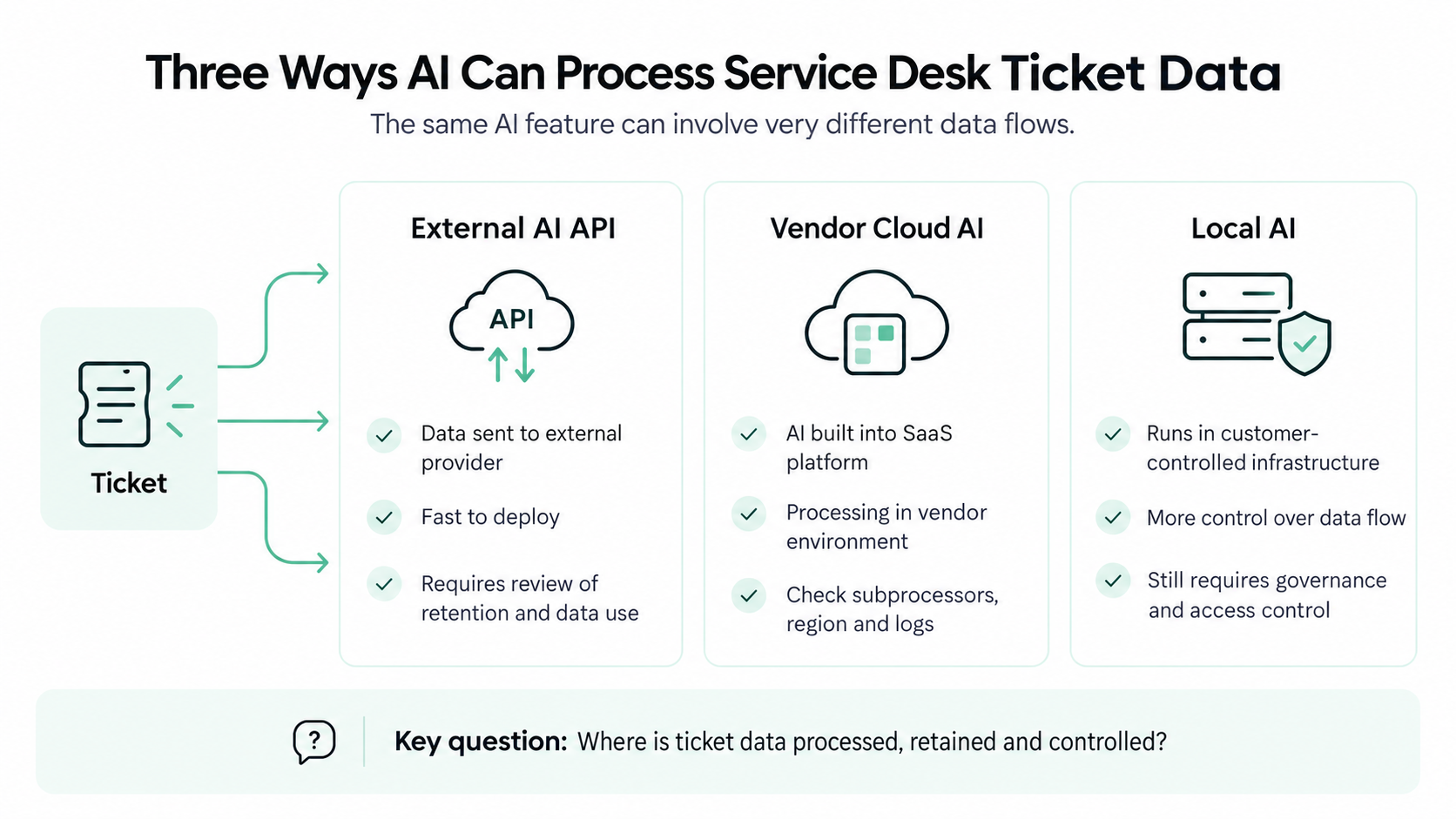
Three ways AI can process Service Desk ticket data
AI architectures differ between vendors, but from the organisation’s perspective they can usually be grouped into three broad models. This distinction is important because the same user-facing feature can involve very different data flows.
1. External AI API
In the first model, the Service Desk sends selected information to an external AI provider through an API.
A simplified flow might look like this:
ticket created in the ITSM platform → the system prepares the prompt and context → data is sent to an external AI service → the model generates a result → the result is returned to the Service Desk
Technically, this is a convenient architecture. The ITSM vendor does not need to maintain the model infrastructure itself and can provide generative AI capabilities relatively quickly.
The trade-off is that some data leaves the application environment and is processed by another provider.
That does not automatically make the solution insecure or non-compliant. Enterprise AI services may offer contractual safeguards, configurable retention and restrictions on using customer data for model training.
But these safeguards should be verified.
They should not be assumed.
2. AI inside the ITSM vendor’s cloud
The second model can look very different to the user while raising similar questions about data control.
AI is built directly into the SaaS platform and processing happens within the ITSM vendor’s environment.
The organisation may not call an external API directly and may not even know which model is used underneath. AI simply appears as another native platform capability.
That makes deployment easier, but it creates a different set of questions.
Is the model hosted directly by the ITSM vendor? Is another AI provider acting as a subprocessor? In which region does processing take place? What ticket information is sent into the AI layer? How long is it retained? Do operational logs contain ticket content?
The statement “AI is built into the platform” does not answer any of those questions.
3. Local AI
The third model is AI running inside infrastructure controlled by the organisation.
The model may run alongside an On-Premises Service Desk or inside another dedicated environment controlled by the customer.
In this architecture, a ticket does not have to be sent to an external AI provider in order to generate a summary or suggest a response.
This can be particularly relevant for organisations with strict information-flow policies, restricted networks, regulatory requirements or internal rules that prevent Service Desk data from being processed outside a controlled environment.
However, “local” does not automatically solve every security problem.
The organisation still needs to know what information the model can access, who can access the AI service, how activity is logged, how models and components are updated and how permissions are enforced.
The key difference is primarily where processing takes place and how much control the organisation has over that environment.
“Does the model train on our data?” is not the same question as “Where does the model run?”
These two topics are often treated as if they were the same.
They are not.
A model can operate outside the organisation while the provider contractually commits not to use customer data for training.
Conversely, a local system can process information entirely within the organisation while still storing logs or using ticket information for local retrieval mechanisms.
So the question:
“Is our data used to train the AI model?”
does not replace:
“Where is our data processed?”
And the reverse is also true.
When evaluating an AI architecture, it is useful to separate at least three issues:
processing location, data retention and subsequent use of the data.
This matters particularly in Service Desk environments because the person clicking Summarize ticket may have little visibility into what information is actually being passed to the model.
The more context AI receives, the more important data governance becomes
AI models need context to provide useful answers.
Summarising a single message requires relatively little information. Suggesting a solution based on previous incidents, documentation and knowledge base content requires considerably more.
That creates a practical paradox.
The more contextual and useful an AI feature becomes, the more information it may need in order to work well.
At the same time, data quality, access permissions and control over connected information sources become increasingly important.
The State of Agentic AI in ITSM 2026 research reflects this. The report identifies data quality, governance and compliance concerns, and internal skills gaps among the barriers to wider use of agentic AI in ITSM.
For IT teams, that is an important signal.
The quality of the model is no longer the only problem to solve.
The quality and governance of the information environment available to that model matter as well.
AI Act: transparency is another layer, not an answer to the data question
From 2 August 2026, the transparency obligations in Article 50 of the EU AI Act apply to relevant AI systems.
One of the areas covered is direct interaction between AI systems and individuals. Where an AI system is intended to interact directly with a person, that person should generally be informed that they are interacting with AI unless this is obvious from the circumstances.
That distinction matters in Service Desk.
An internal AI assistant that summarizes a ticket for an agent is a different scenario from an AI chatbot that communicates directly with an employee or customer.
So Article 50 should not be reduced to a simplistic rule that:
“Every AI feature in a Service Desk needs an AI label.”
The obligations depend on how the system is used.
For IT teams evaluating Service Desk software, the practical conclusion is simpler:
transparency requirements do not replace an architectural review of how data is processed.
Telling a user that they are interacting with AI explains who or what generated the response.
It still does not explain where the data required to generate that response was processed. The European Commission’s Article 50 guidance confirms that these transparency requirements apply from 2 August 2026.
Five questions to ask an AI Service Desk vendor
Before allowing AI to work with real production tickets, get clear answers to five questions:
Exactly what data is sent to the AI? Is it only the current ticket description, or also conversation history, requester data, attachments, knowledge base content and previous tickets?
Where does processing take place? Does the model run at an external AI provider, inside the ITSM vendor’s cloud or within infrastructure controlled by your organisation?
Is the data retained after the request is processed? If so, where is it stored, for how long and for what purpose?
Is customer data used to train or improve models? The answer should come from contractual terms and technical documentation, not assumptions.
Can AI run locally, and which features actually run locally? “On-Premises” should describe the AI architecture itself, not simply the location where ticket records are stored while AI processing still happens elsewhere.
These questions are useful both during vendor evaluation and when preparing an RFP or Proof of Concept.
A PoC should test data flow, not only answer quality
A typical AI test is simple: provide several tickets, review the generated summaries and decide whether the answers are accurate.
That is not enough.
A useful Proof of Concept should also show where AI gets its context from and where that context goes.
Test different types of tickets: a short incident, a long conversation thread, a request linked to an asset, a ticket containing logs and a case in which the AI should not be able to access certain information.
This allows you to evaluate not only model quality but also access controls.
If an agent cannot access a particular document or information source, AI should not be able to bypass that restriction simply because additional context would improve its answer.
This will become increasingly important as ITSM platforms introduce more autonomous and agentic AI capabilities.
How does Mint Service Desk approach AI?
Mint Service Desk uses a local AI model for its On-Premises environment.
The module operates within the customer’s infrastructure and does not require ticket data to be sent to external cloud AI services. In its current scope, it can generate ticket summaries and suggest responses to agents. The AI module is available as a separately licensed paid add-on.
This follows the broader On-Premises architecture of Mint Service Desk, where the platform can be deployed on infrastructure controlled by the customer and organisational data can remain within that environment.
You can learn more on the AI On-Premises in Mint Service Desk product page.
Mint’s current public AI documentation also states that the model analyses ticket content, communication history and knowledge available within the local instance without sending that information outside the environment.
This does not mean local AI is the right architecture for every organisation.
For many companies, the convenience of a SaaS AI service will outweigh the need for direct infrastructure control. For others, security requirements, internal policies or network architecture will make external processing unacceptable.
So the decision should not begin with:
Cloud or On-Premises?
It should begin with:
How much control over Service Desk data does our organisation actually require?
How does local AI work in Mint Service Desk?
Mint Service Desk provides a local AI module for its On-Premises deployment.
The module runs within the customer’s infrastructure, so ticket data does not need to be sent to external cloud AI services. In its current scope, AI can support agents by generating ticket summaries and suggesting responses.
The AI module is available as a separately licensed paid add-on.
This architecture is designed for organisations that want to use AI while maintaining direct control over where Service Desk data is processed.
This does not mean local AI is the right approach for every organisation. For some companies, a SaaS AI service will provide the right balance of convenience and functionality. For others, security policies, infrastructure requirements or data governance rules may make local processing preferable.
The key question is not whether AI is cloud-based or local.
It is:
How much control over ticket data does your organisation actually need?
Potem od razu przechodzimy do:
Don’t ask only what AI can do. Ask where it runs.
Na końcu artykułu zamiast CTA na webinar dałabym tylko dwa spokojne CTA:
AI can create real value in Service Desk operations.
It can reduce the time agents spend reading long ticket histories, help them understand a problem faster and support repetitive parts of ticket handling.
But as AI becomes more capable, the amount of context required by the model also increases.
That means an AI evaluation should not end with the quality of the generated answer.
You also need to know what data the model received, where it was processed, whether it was retained and who controls the environment in which the processing occurred.
In practice, those questions may become more important than another feature marked AI-powered in a pricing table.
FAQ: AI in Service Desk and ticket data privacy
Does AI in a Service Desk always send data to an external model?
No. It depends on the architecture of the solution. AI may use an external API, run inside the ITSM vendor’s cloud environment or operate locally within infrastructure controlled by the organisation. The actual data flow should be verified before deployment.
What ticket data can AI analyse?
It depends on the feature and configuration. AI may receive the ticket title and description, conversation history, requester information, knowledge base content, previous cases, logs, attachments or other information supplied as context. Vendors should clearly document which data is used.
Is local AI more secure than cloud AI?
Processing location alone is not enough to determine whether an AI solution is secure. Local AI can provide greater control over data flows and reduce the need to send information to an external provider, but it still requires appropriate access controls, infrastructure security, logging and maintenance.
Does the AI Act require users to be told when they are interacting with AI?
Article 50 of the EU AI Act introduces transparency obligations for certain AI systems from 2 August 2026. For AI systems intended to interact directly with individuals, users generally need to be informed that they are interacting with AI unless this is obvious from the circumstances. This does not automatically mean that every internal AI feature used only to support an agent is subject to the same interaction disclosure requirement.